AB-3 Developer Guide
Acknowledgements
- Codebase adapted from AddressBook3
- Libraries used: JavaFX, Jackson, JUnit5
Setting up, getting started
Refer to the guide Setting up and getting started.
Design
Architecture
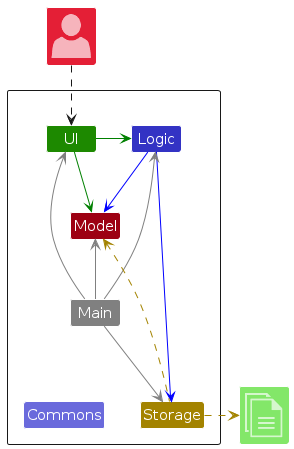
The Architecture Diagram given above explains the high-level design of the App.
Given below is a quick overview of main components and how they interact with each other.
Main components of the architecture
Main (consisting of classes Main and MainApp) is in charge of the app launch and shut down.
- At app launch, it initializes the other components in the correct sequence, and connects them up with each other.
- At shut down, it shuts down the other components and invokes cleanup methods where necessary.
The bulk of the app's work is done by the following four components:
UI: The UI of the App.Logic: The command executor.Model: Holds the data of the App in memory.Storage: Reads data from, and writes data to, the hard disk.
Commons represents a collection of classes used by multiple other components.
How the architecture components interact with each other
The Sequence Diagram below shows how the components interact with each other for the scenario where the user issues the command delete_s 1.
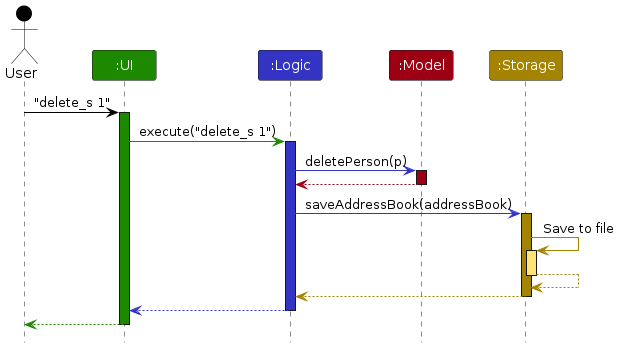
Each of the four main components (also shown in the diagram above),
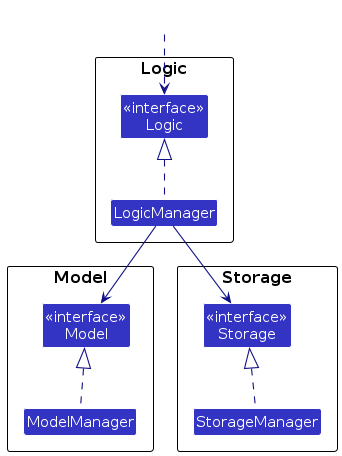
- defines its API in an
interfacewith the same name as the Component. - implements its functionality using a concrete
{Component Name}Managerclass (which follows the corresponding APIinterfacementioned in the previous point.
For example, the Logic component defines its API in the Logic.java interface and implements its functionality using the LogicManager.java class which follows the Logic interface. Other components interact with a given component through its interface rather than the concrete class (reason: to prevent outside component's being coupled to the implementation of a component), as illustrated in the (partial) class diagram below.
The sections below give more details of each component.
UI component
The API of this component is specified in Ui.java
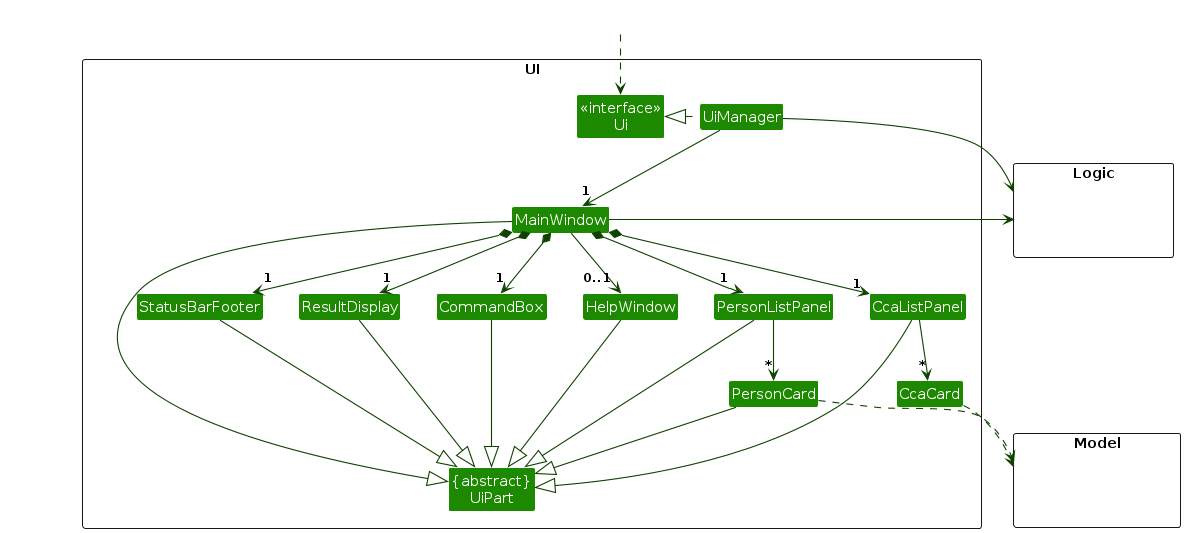
The UI consists of a MainWindow that is made up of parts e.g.CommandBox, ResultDisplay, PersonListPanel, StatusBarFooter etc. All these, including the MainWindow, inherit from the abstract UiPart class which captures the commonalities between classes that represent parts of the visible GUI.
The UI component uses the JavaFx UI framework. The layout of these UI parts are defined in matching .fxml files that are in the src/main/resources/view folder. For example, the layout of the MainWindow is specified in MainWindow.fxml.
The UI component,
- executes user commands using the
Logiccomponent. - listens for changes to
Modeldata so that the UI can be updated with the modified data. - keeps a reference to the
Logiccomponent, because theUIrelies on theLogicto execute commands. - depends on some classes in the
Modelcomponent, as it displaysPersonobject residing in theModel.
Logic component
API : Logic.java
Here's a (partial) class diagram of the Logic component:
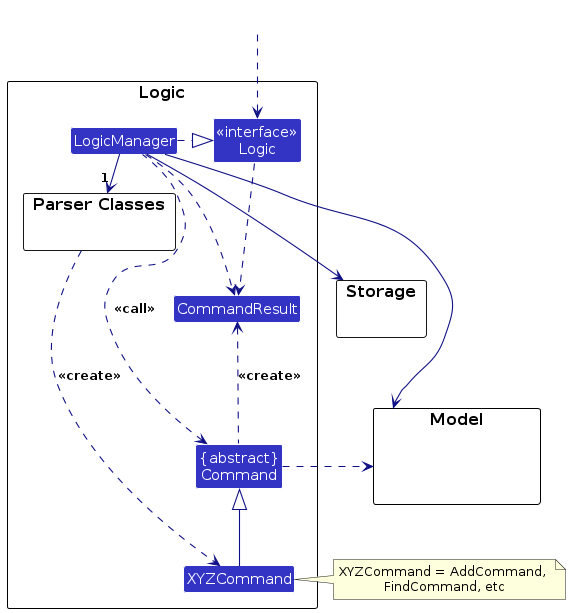
How the Logic component works:
- When
Logicis called upon to execute a command, it is passed to anAddressBookParserobject which in turn creates a parser that matches the command (e.g.,DeleteStudentCommandParser) and uses it to parse the command. - This results in a
Commandobject (more precisely, an object of one of its subclasses e.g.,DeleteStudentCommand) which is executed by theLogicManager. - The command can communicate with the
Modelwhen it is executed (e.g. to delete a student).
Note that although this is shown as a single step in the diagram above (for simplicity), in the code it can take several interactions (between the command object and theModel) to achieve. - The result of the command execution is encapsulated as a
CommandResultobject which is returned back fromLogic.
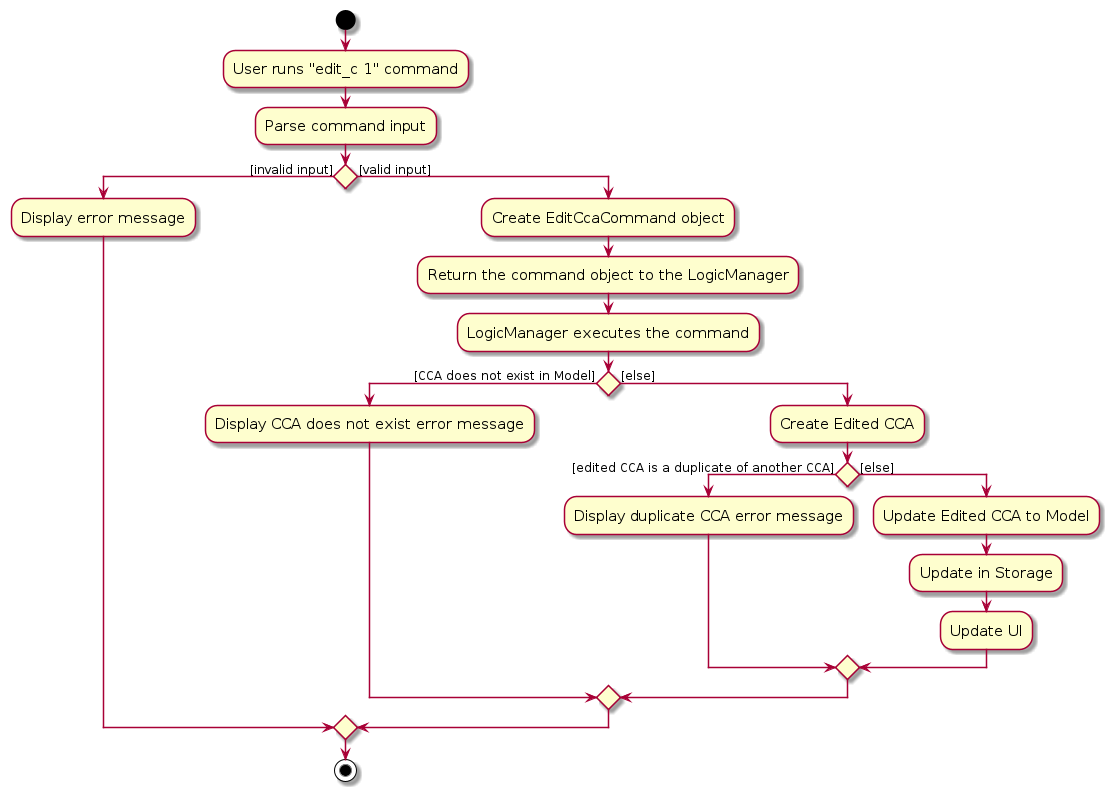
Here is the simplified workflow on how the Logic component interacts when a user executes a command, , taking EditCCACommand as an example.
Here are the other classes in Logic (omitted from the class diagram above) that are used for parsing a user command:
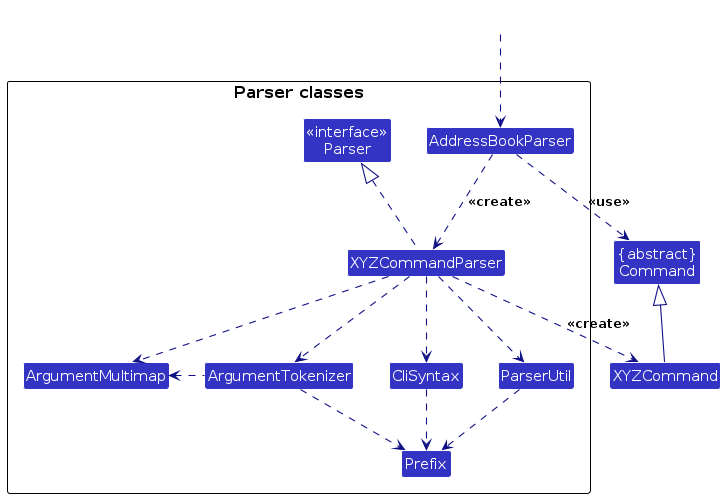
How the parsing works:
- When called upon to parse a user command, the
AddressBookParserclass creates anXYZCommandParser(XYZis a placeholder for the specific command name e.g.,AddCommandParser) which uses the other classes shown above to parse the user command and create aXYZCommandobject (e.g.,AddCommand) which theAddressBookParserreturns back as aCommandobject. - All
XYZCommandParserclasses (e.g.,CreateStudentCommandParser,DeleteStudentCommandParser, ...) inherit from theParserinterface so that they can be treated similarly where possible e.g, during testing.
The sequence diagram below illustrates the simplified interactions within the Logic component, taking execute("delete_s 1") API call as an example.
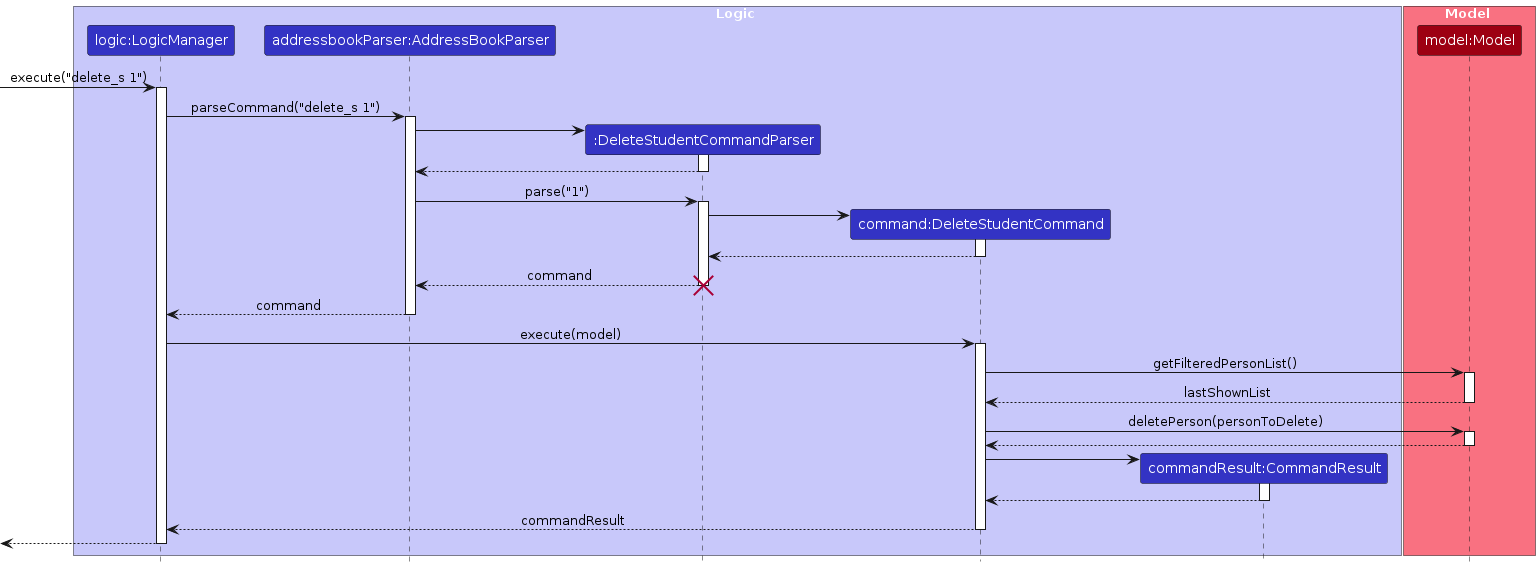
Note: The lifeline for DeleteStudentCommandParser should end at the destroy marker (X) but due to a limitation of PlantUML, the lifeline continues till the end of diagram.
Model component
API : Model.java
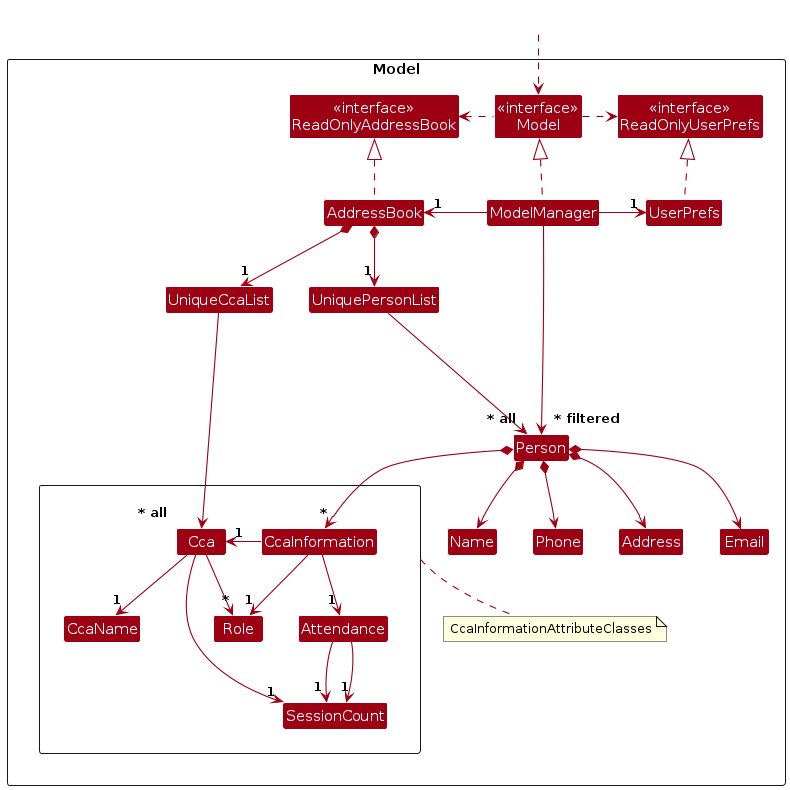
The Model component,
- stores CCAttendance's data i.e., all
Personobjects andCcaobjects (which are contained in aUniquePersonListobject and aUniqueCcaListrespectively). - stores the currently 'selected'
Personobjects (e.g., results of a search query) as a separate filtered list which is exposed to outsiders as an unmodifiableObservableList<Person>that can be 'observed' e.g. the UI can be bound to this list so that the UI automatically updates when the data in the list change. - stores the current
Ccaseparately in as an unmodifiableObservableList<Cca>just likePersonobjects, however, there is no 'selected' objects. - stores a
UserPrefobject that represents the user’s preferences. This is exposed to the outside as aReadOnlyUserPrefobjects. - does not depend on any of the other three components (as the
Modelrepresents data entities of the domain, they should make sense on their own without depending on other components).
CcaInformation Attribute Classes
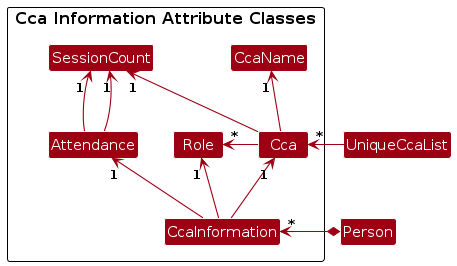
The AddressBook contains a list of Cca objects, and each Student references a CcaInformation object that contains a unique Cca. By storing each CCA only once in the AddressBook and having each Student reference it through a CcaInformation object, it avoids duplicating CCA data across students. The Addressbook also ensures that each CcaInformation can have a unique Cca, preventing duplicate CCAs in the system.
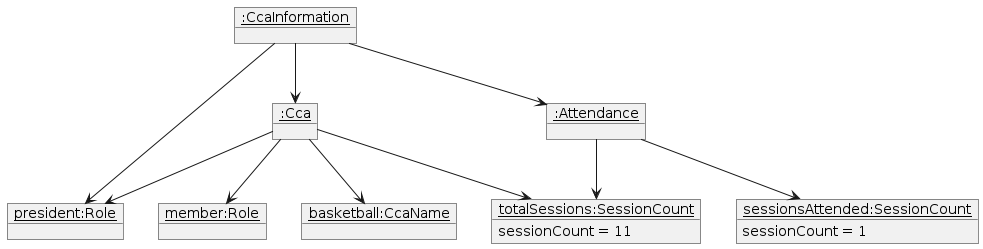
For example, the following object diagrams can be formed:
Storage component
API : Storage.java
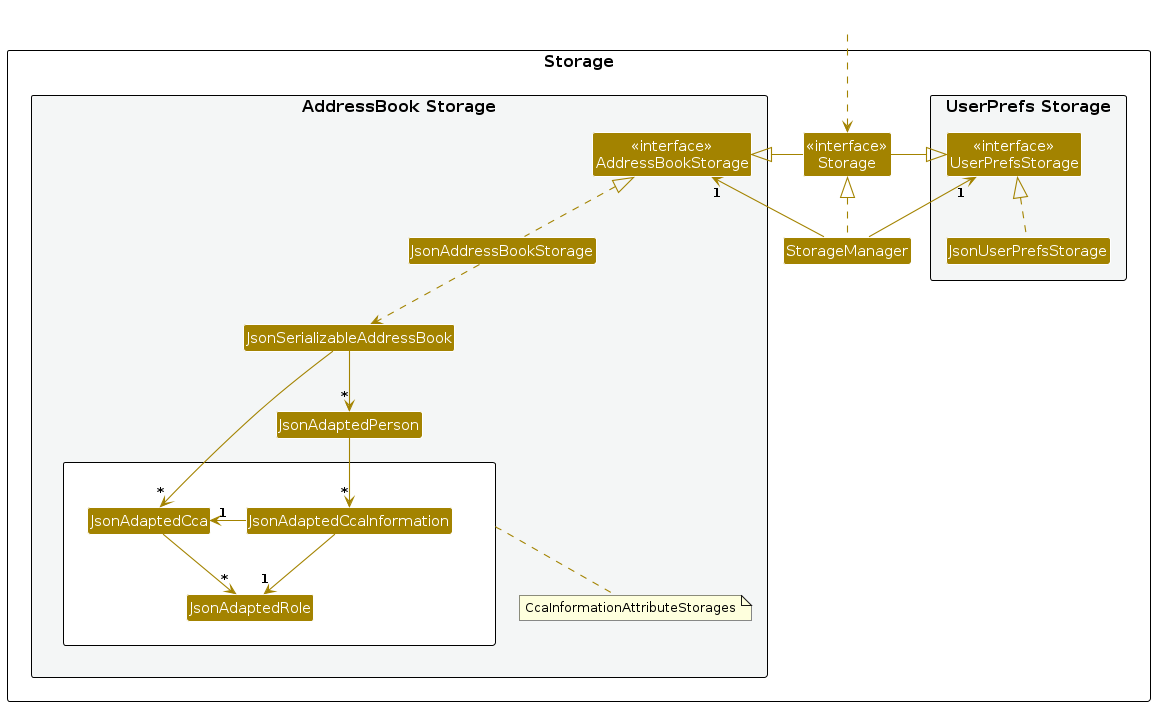
The Storage component,
- can save both CCAttendance data and user preference data in JSON format, and read them back into corresponding objects.
- inherits from both
AddressBookStorageandUserPrefStorage, which means it can be treated as either one (if only the functionality of only one is needed). - depends on some classes in the
Modelcomponent (because theStoragecomponent's job is to save/retrieve objects that belong to theModel).
Common classes
Classes used by multiple components are in the seedu.address.commons package.
Documentation, logging, testing, configuration, dev-ops
Appendix: Requirements
Product scope
Target user: Hall attendance managers
Target user profile:
- Resolve the distress of the hall attendance manager caused by the current complex and unorganized CCA attendance system.
- Provide a simple and easy-to-use software that effectively tracks all CCA attendances for hall students.
- Accommodate the manager’s “lazy” nature by streamlining workflows and reducing complexity.
- Prioritize typing over mouse usage to align with the manager’s preferences.
Value proposition: It provides a centralized tracking system for the CCA attendance for hall students in different CCAs, which is required for the point calculation. Students are grouped by CCAs, and each student has their total attended sessions for each CCA. CLI commands allow easy attendance recording and management of students and CCAs.
User stories
- Priorities: High (must have) -
* * *, Medium (nice to have) -* *, Low (unlikely to have) -*. - HAM below refers to Hall Attendance Managers.
| Index | Priority | As a … | I can … | So that I can… |
|---|---|---|---|---|
| 1 | * * * | HAM | create new students in the student list | store their information. |
| 2 | * * * | HAM | delete existing students from the student list | remove ex-students and other redundant data. |
| 3 | * * | HAM | filter student list by name | find students quickly. |
| 4 | * * * | HAM | create a CCA role | label students according to specific responsibilities in that CCA. |
| 5 | * * * | HAM | delete an existing CCA role | remove any outdated roles from a CCA |
| 6 | * * * | HAM | add roles to a student in a CCA | categorize students by their responsibilities (e.g. captain, exco, non-official member). |
| 7 | * * * | HAM | remove a role from a student in a CCA | remove any outdated roles (e.g. if the student resigns from a role). |
| 8 | * * | HAM | edit student profiles | keep their information up to date and recover from mistakes (e.g. a change of address). |
| 9 | * * | HAM | edit CCA profiles | keep CCA information up to date and recover from mistakes (e.g. update total sessions) |
| 10 | * | new HAM | use the “help” command | learn how to use the application. |
| 11 | * * * | potential HAM exploring the app | see the application populated with sample student information | understand how it looks in active use. |
| 12 | * * * | new HAM ready to start using the app | purge all current data | remove any sample student information used for testing. |
| 13 | * | HAM taking over from another HAM | import student profiles | transfer existing student information into my system. |
| 14 | * | HAM taking over from another HAM | export student profiles | pass the current student information on to another HAM. |
| 15 | * * * | HAM | record a student’s attendance in a CCA | accurately record students' attendance of CCA sessions |
| 16 | * * * | HAM | see the number of sessions each student has attended | accurately track students' attendance |
| 17 | * * | HAM | set a maximum attendance for CCA | have a better idea of the student’s attendance rate. |
| 18 | * * * | HAM | create a new CCA | assign it to students. |
| 19 | * * * | HAM | delete a CCA | remove any CCA that are no longer active or needed. |
| 20 | * * * | HAM | add a CCA to a student | keep their records accurate. |
| 21 | * * * | HAM | delete a CCA from a student | update their status if they leave or switch CCAs. |
| 22 | * * * | HAM | view the list of CCAs separately from the student list | see all CCAs at once. |
| 23 | * * | HAM | see the list of roles in a CCA | know which roles can be assigned to students. |
| 24 | * * | HAM | have automatic validation of CCA names when adding CCA to student | avoid errors when adding CCA to students. |
| 25 | * * | HAM | have automatic validation of role names when adding role to student | avoid errors when adding roles to students. |
| 26 | * * | HAM | save my changes when I exit the application | avoid losing important changes |
| 27 | * * | HAM | see the list of all students in the system | know who is in the system. |
| 28 | * * | HAM | see the list of all CCAs in the system | know which CCAs are in the system. |
| 29 | * * | HAM | see the list of roles in each CCA | know which roles each CCA has. |
| 30 | * * | HAM | record attendance for more than one session at a time | save time when recording attendance. |
Use cases
(For all use cases below, the System is CCAttendance, the person is Hall Attendance Manager, and the Actor is the user, unless specified otherwise).
UC1: List students
MSS
User requests to list students.
System shows a list of all students.
Use case ends.
Extensions
1a. The student list is empty.
Use case ends.
UC2: Create a student
MSS
User lists the students (UC1).
User requests to create a student with the corresponding details.
System creates the student and adds it to the student list.
System shows the student has been added.
Use case ends.
Extensions
2a. The student already exists in the student list.
2a1. System shows an error message.
Use case resumes at step 2.
UC3: Delete a student
MSS
User lists the students (UC1).
User requests to delete a specific student.
System deletes the student from the student list.
System shows the student has been deleted.
Use case ends.
Extensions
2a. The student does not exist in the student list.
2a1. System shows an error message.
Use case resumes at step 2.
UC4: Edit a student
MSS
User lists the students (UC1).
User requests to edit a student's information from the list.
System edits the student from the list.
System shows the student has been edited.
Use case ends.
Extensions
2a. The student does not exist in the student list.
2a1. System shows an error message.
Use case resumes at step 2.
2b. The parameters to edit does not exist.
2b1. System shows an error message.
Use case resumes at step 2.
2c. The parameters to edit is invalid.
2c1. System shows an error message.
Use case resumes at step 2.
UC5: Find a student
MSS
User requests to find students with specific keywords in a name.
System searches for students matching the keywords.
System shows a list of searched students.
Use case ends.
Extensions
1a. No students match the keywords. Use case ends.
1b. The student list is empty. Use case ends.
1c. The keyword is an invalid format or missing keywords.
1c1. System shows an error message.
Use case resumes at step 1.
UC6: Create a CCA
MSS
User requests to create a CCA with the corresponding details.
System creates the CCA and adds it to the CCA list.
System shows the CCA has been added.
Use case ends.
Extensions
1a. The CCA already exists in the CCA list.
1a1. System shows an error message.
Use case resumes at step 1.
UC7: Delete a CCA
MSS
System shows list of CCAs.
User requests to delete a specific CCA.
System deletes the CCA from the list.
System shows the CCA has been deleted.
Use case ends.
Extensions
2a. The CCA does not exist in the list.
2a1. System shows an error message.
Use case resumes at step 2.
UC8: Edit a CCA
MSS
System shows list of CCAs.
User requests to edit a CCA's information from the list.
System edits the CCA from the list.
System shows the CCA has been edited.
Use case ends.
Extensions
2a. The CCA does not exist in the CCA list.
2a1. System shows an error message.
Use case resumes at step 2.
2b. The parameters to edit does not exist.
2b1. System shows an error message.
Use case resumes at step 2.
2c. The parameters to edit is invalid.
2c1. System shows an error message.
Use case resumes at step 2.
UC9: Add a role to a student in a CCA
MSS
User lists the students (UC1).
System shows list of CCAs.
User requests to add a role to a specific student in a specific CCA.
System adds the role to the student in the CCA.
System shows the role has been added.
Use case ends.
Extensions
3a. The student does not exist in the student list.
3a1. System shows an error message.
Use case resumes at step 3.
3b. The CCA does not exist in the CCA list.
3b1. System shows an error message.
Use case resumes at step 3.
3c. The student already has a role in the CCA.
3c1. System shows student already has role in the CCA.
Use case resumes at step 3.
3d. The student is not in the CCA.
3d1. System shows an error message.
Use case resumes at step 3.
3e. The role does not exist.
3e1. System shows an error message.
Use case resumes at step 3.
UC10: Remove a role from a student in a CCA
MSS
User lists the students (UC1).
User requests to remove a role from a specific student in a specific CCA.
System removes the role from the student in the CCA.
System shows the role has been removed.
Use case ends.
Extensions
2a. The student does not exist in the student list.
2a1. System shows an error message.
Use case resumes at step 2.
2b. The CCA does not exist in the CCA list.
2b1. System shows an error message.
Use case resumes at step 2.
2c. The student is not in the CCA.
2c1. System shows an error message.
Use case resumes at step 2.
2d. The student does not have the role in the CCA.
2d1. System shows an error message.
Use case resumes at step 2.
UC11: Add CCA to a student
MSS
User requests to list the students (UC1).
System shows list of CCAs.
User requests to add a CCA to a specific student.
System adds the CCA to the student.
System shows the CCA has been added.
Use case ends.
Extensions
2a. The CCA list is empty.
Use case ends.
3a. The student does not exist in the student list.
3a1. System shows an error message.
Use case resumes at step 3.
3b. The CCA does not exist in the CCA list.
3b1. System shows an error message.
Use case resumes at step 3.
3c. The student is already in the CCA.
3c1. System shows student already in CCA.
Use case resumes at step 3.
UC12: Delete a CCA from a student
MSS
User lists the students (UC1).
User requests to delete a CCA from a specific student.
System deletes the CCA from the student.
System shows the CCA has been deleted.
Use case ends.
Extensions
2a. The student does not exist in the student list.
2a1. System shows an error message.
Use case resumes at step 2.
2b. The CCA does not exist in the CCA list.
2b1. System shows an error message.
Use case resumes at step 2.
2c. The student is not in the CCA.
2c1. System shows an error message.
Use case resumes at step 2.
UC13: Clear all students
MSS
User requests to clear all the students.
System clears all the students.
System shows all the students have been cleared.
Use case ends.
UC14: Record a student's attendance
MSS
User lists the students (UC1).
User requests to record a certain attendance amount for a specific student and a given CCA.
System increments the student’s attendance in that CCA by the requested amount.
System shows that the attendance has been updated successfully.
Use case ends.
Extensions
2a. The student does not exist in the student list.
2a1. System shows an error message.
Use case resumes at step 2.
2b. The CCA does not exist in the CCA list.
2b1. System shows an error message.
Use case resumes at step 2.
2c. The student is not in the specified CCA.
2c1. System shows an error message.
Use case resumes at step 2.
2d. The attendance amount is missing or invalid.
2d1. System shows an error message.
Use case resumes at step 2.
UC15: Exit the application
MSS
User requests to exit the application.
System saves all the data and closes the application.
Use case ends.
Non-Functional Requirements
Note: Several non-functional requirements listed above are derived from the project constraints specified in the course documentation. These requirements explicitly state the relevant constraints for better validation. For more details, please refer to CS2103T Constraints at CS2103T-Constraints.
Platform Compatibility: The application should work on any mainstream OS (Windows, Linux, macOS) as long as Java
17or above is installed. (Constraint-Platform-Independent, Constraint-Java-Version)Performance: The application should be able to hold up to 1000 students without noticeable sluggishness in performance for typical usage. (Scalability requirement)
Typing Efficiency: A user with above-average typing speed for regular English text (i.e., not code, not system admin commands) should be able to accomplish most tasks faster using commands than using the mouse. (Constraint-Typing-Preferred, Recommendation-CLI-First)
Incremental Development: The software should be developed in small, incremental updates throughout the project lifecycle instead of being built in one go. (Constraint-Incremental)
Storage Format: Data should be stored in a human-editable text file (e.g., JSON, CSV) rather than a database or proprietary format. (Constraint-Human-Editable-File, Constraint-No-DBMS)
Portability: The application should not require an installer and should be packaged as a single JAR file. (Constraint-Portable, Constraint-Single-File)
No Remote Server Dependency: The application should be fully functional without requiring an internet connection or an external server. (Constraint-No-Remote-Server, Recommendation-Minimal-Network)
Screen Resolution Support: The GUI should work well on standard screen resolutions (1920×1080 and higher) and be usable at lower resolutions (1280×720). (Constraint-Screen-Resolution)
Security & Privacy: User data should be stored locally and should not be accessible to other users during regular operations. (Constraint-Single-User)
Extensibility & Maintainability: The application should follow Object-Oriented Programming (OOP) principles, making it easy to extend and modify. (Constraint-OO)
Glossary
- Mainstream OS: Windows, Linux, Unix, MacOS.
- CLI: Command Line Interface, a text-based interface that allows users to interact with the system by typing commands.
- GUI: Graphical User Interface, a visual interface that allows users to interact with the system using graphical elements such as CLI, buttons, etc.
- Index: A number that represents the position of student or CCA. It is shown in the UI on the left side of the student or CCA details.
- HAM: Hall attendance manager, i.e. the one in charge of taking attendance of the students.
- Role: The position the student has in the CCA, e.g. Captain, President.
Appendix: Instructions for manual testing
Given below are instructions to test the app manually.
Note: These instructions only provide a starting point for testers to work on; testers are expected to do more *exploratory* testing.
Launch and shutdown
Initial launch
Download the jar file and copy into an empty folder.
Double-click the jar file Expected: Shows the GUI with a set of sample contacts. The window size may not be optimum.
If this doesn't work, open a terminal in the folder and run the command
java -jar CCAttendance.jar.
Saving window preferences
Resize the window to an optimum size. Move the window to a different location. Close the window.
Re-launch the app by double-clicking the jar file.
Expected: The most recent window size and location is retained.Refer to the initial launch instructions if double-clicking doesn't work.
Listing all students
- List all students
- Test case:
listExpected: The list should contain all students. The status message should reflect the successful listing of all students.
- Test case:
Clearing all students and CCAs
- Clears all students and CCAs
- Prerequisites: List all students using the
listcommand. Multiple students in the list. - Test case:
clearExpected: Both the student list and the CCA list should be empty. The status message should reflect the successful clearing of all students and CCAs.
- Prerequisites: List all students using the
Finding a student
- Find a student by querying name
- Prerequisites: For this test, you will use the sample data provided when the app is launched the first time. Make sure the data file is not corrupted.
- Test case:
find AlexExpected: The list should contain one studentAlex Yeohonly.
Creating a student
- Creating a student
- Prerequisites: List all students using the
listcommand. Multiple students in the list.John Doeis not in student list, there are no students with email ofe0000000@u.nus.eduor phone number of98765432. - Test case:
create_s n/John Doe p/98765432 e/e0000000@u.nus.edu a/Raffles Hall 22/B/2Expected: A new student is added to the list. The student details are shown in the list. - Test case:
create_s n/John Doe p/98765432Expected: Error message is shown as insufficient parameters are provided. The student is not added to the list. - Test case:
create_s n/John Doe p/98765432 e/e0000000@u.nus.edu a/Raffles Hall 22/B/2Expected: Error message is shown as the student already exists in the list. The student is not added to the list. - Other incorrect create student commands to try:
create_s n/helloworld* p/helloworld* e/helloworld* a/helloworld*(incorrect inputs, missing inputs, or incorrect prefixes used). Expected: Error message is shown as parameters with invalid formats were provided. The student is not added to the list.
- Prerequisites: List all students using the
Deleting a student
- Deleting a student while all students are being shown
- Prerequisites: List all students using the
listcommand. Multiple students in the list. - Test case:
delete_s 1Expected: First contact is deleted from the list. Details of the deleted contact shown in the status message. - Test case:
delete_s 0Expected: No student is deleted. Error details shown in the status message. - Other incorrect delete commands to try:
delete_s,delete_s x,...(where x is larger than the list size). Expected: Similar to previous.
- Prerequisites: List all students using the
Creating a CCA
- Creating a CCA with a CCA name
- Prerequisites: Multiple CCAs in the list.
Handballis not in CCA list. - Test case:
create_c c/HandballExpected: A new CCA is added to the list. The CCA details are shown in the list. - Test case:
create_cExpected: No CCA is added. Error details shown in the status message as the CCA name is not provided. - Test case:
create_c c/HandballExpected: No CCA is added. Error details shown in the status message as the CCA already exists. - Other test cases to try:
create_c c/helloworld*(incorrect inputs, missing inputs, or incorrect prefixes used). Expected: No CCA is added. Error message is shown as parameters with invalid formats were provided.
- Prerequisites: Multiple CCAs in the list.
Deleting a CCA
- Deleting a CCA while all CCAs are being shown
- Prerequisite: One CCA in the CCA list.
- Test case:
delete_c 1Expected: The first CCA is deleted from the list. Details of the deleted CCA shown in the status message. - Test case:
delete_c 1Expected: There are no more CCAs in the list. Error details are shown in the status message. - Test case:
delete_c 0Expected: No CCA is deleted. Error details shown in the status message. - Other incorrect delete commands to try:
delete_c,delete_c x,...(where x is larger than the list size). Expected: Similar to previous.
Editing a student
- Editing an existing student's name, phone, email and address
- Prerequisites: List all students using the
listcommand. Multiple students in the list andClark Kentis not in the list, there are no students with phone number of99999999or email ofe0000000@u.nus.edu. It is okay for the edited student's original name to be Clark Kent. - Test case:
edit_s 1 n/Clark Kent p/99999999 e/e0000000@u.nus.edu a/Raffles Hall 22/B/2Expected: The first student's name is changed toClark Kent. The updated student details are shown in the list. - Test case:
edit_s 2 n/Clark KentExpected: No student is edited. Error details are shown in the status message as Clark Kent already exists in the list. - Test case:
edit_s 0 n/Josh YosephExpected: No student is edited. Error details shown in the status message as the index is out of the student list. - Other test cases to try:
edit_s 1 n/helloworld* p/helloworld* e/helloworld* a/helloworld*(incorrect inputs, missing inputs, or incorrect prefixes used). Expected: No student is edited. Error message is shown as parameters with invalid formats were provided.
- Prerequisites: List all students using the
- Editing CCA of a student will be handled in separate test cases below.
Editing a CCA
Editing an existing CCA's name, roles, and total sessions
- Prerequisites: Multiple CCAs in the CCA list and there is no
BasketballCCA. It is okay for the edited CCA's original name to beBasketball. - Test case:
edit_c 1 c/Basketball t/15 r/President r/Vice-President r/TreasurerExpected: The first CCA's name is changed toBasketball. The respective details are changed as specified. The updated CCA details are shown in the list. - Test case:
edit_c 2 c/BasketballExpected: No CCA is edited as the CCA already has the nameBasketball. Error details are shown in the status message as the CCA already exists in the list. - Test case:
edit_c 0 c/ChessExpected: No CCA is edited. Error details shown in the status message as the index is out of the CCA list. - Other test cases to try:
edit_c 1 c/helloworld*(incorrect inputs, missing inputs, or incorrect prefixes used, wrong index used). Expected: No CCA is edited. Error message is shown as parameters with invalid formats were provided.
- Prerequisites: Multiple CCAs in the CCA list and there is no
Editing a role of a CCA is handled in separate test cases below.
Editing a role of a CCA
Adding a role to a CCA
- Prerequisite: Multiple CCAs in the CCA list.
- Test case:
edit_c 1 r/President r/Vice-President r/TreasurerExpected: The first CCA's roles are replaced withPresident,Vice-President,Treasurer, and defaultMemberroles. The updated CCA details are shown in the list. - Test case:
edit_c 1 r/PresidentExpected: The first CCA's roles are replaced with thePresidentand defaultMemberrole. Other roles get deleted. The updated CCA details are shown in the list. - Test case:
edit_c 0 r/TreasurerExpected: No CCA is edited. Error details shown in the status message as the index is out of the CCA list. - Other test cases to try:
edit_c 1 r/helloworld*(incorrect inputs, missing inputs, or incorrect prefixes used). Expected: No CCA is edited. Error message is shown as parameters with invalid formats were provided.
Deleting a role from a CCA
- Prerequisites: Multiple CCAs in the CCA list. The first CCA has at least one role.
- Test case:
edit_c 1 r/Expected: The first CCA's roles are removed and only left with defaultMember. The updated CCA details are shown in the list. - Test case:
edit_c 0 r/Expected: No CCA is edited. Error details shown in the status message as the index is out of the CCA list. Status bar remains the same.
Record Attendance
- Recording attendance for a student already in a CCA
- Prerequisites: Multiple students in the list (e.g., from previous sample data). The second student (index
2) is already in theBasketballCCA. TheChessCCA does not exist andDanceCCA is not contained in the first student. The second student does not have full attendance inBasketballCCA. - Test case:
attend 2 c/Basketball a/1Expected: The second student’s attendance for theBasketballCCA is incremented by 1. A success message is displayed, indicating that attendance has been updated. - Test case:
attend 2 c/Chess a/1Expected: No attendance is recorded. An error message is displayed indicating that theChessdoes not exist). - Test case:
attend 2 c/Dance a/1Expected: No attendance is recorded. An error message is displayed indicating that the student is not in theDanceCCA. - Test case:
attend 0 c/Basketball a/1Expected: No attendance is recorded. An error message is shown, since0is out of the valid student index range. - Test case:
attend 2 c/BasketballExpected: No attendance is recorded. An error message is displayed, indicating missing or invalid parameters (e.g.,a/AMOUNT). - Other incorrect attendance commands to try:
attend,attend x,attend 2,attend 2 c/Basketball a/abc(where x is larger than the list size). Expected: Similar to previous.
- Prerequisites: Multiple students in the list (e.g., from previous sample data). The second student (index
Adding a CCA to a student
- Adding a CCA to a student
- Prerequisites: List all students using the
listcommand. Multiple students in the list. Multiple CCAs in the list and it hasBasketballandActing. It does not containChess. The first student is not inBasketballCCA. - Test case:
add_c 1 c/BasketballExpected: The first student is added to theBasketballCCA. The updated student details are shown in the list. - Test case:
add_c 1 c/BasketballExpected: The first student is already in theBasketballCCA. Error details shown in the status message. - Test case:
add_c 1 c/ChessExpected: The app does not have theChessCCA. Error details shown in the status message. - Test case:
add_c 0 c/BasketballExpected: No student is edited. Error details shown in the status message as the index is out of the student list. - Other test cases to try:
add_c 1 c/helloworld*(incorrect inputs, missing inputs, or incorrect prefixes used) Expected: No student is edited. Error message is shown as parameters with invalid formats were provided.
- Prerequisites: List all students using the
Removing a CCA from a student
- Removing a CCA from a student
- Prerequisites: List all students using the
listcommand. Multiple students in the list. Multiple CCAs in the list and it hasBasketballandActing. It does not containChess. The first student is inBasketballCCA. - Test case:
remove_c 1 c/BasketballExpected: The first student is removed from theBasketballCCA. The updated student details are shown in the list. - Test case:
remove_c 1 c/BasketballExpected: The first student is already not in any CCA. Error details shown in the status message. - Test case:
remove_c 0 c/BasketballExpected: No student is edited. Error details shown in the status message as the index is out of the student list.
- Prerequisites: List all students using the
Adding a role to a student in a CCA
- Adding a role from a student in a CCA
- Prerequisites: List all students using the
listcommand. Multiple students in the list. Multiple CCAs in the list and the first person is in a CCABasketball. TheBasketballCCA hasCaptainrole defined. The first person inBasketballand assigned with a default roleMember. - Test case:
add_r 1 c/Basketball r/MemberExpected: The default roleMembercannot be assigned. Error details are shown in the status message. - Test case:
add_r 1 c/Basketball r/CaptainExpected: The first person is added with the role. The updated student details are shown in the list. - Test case:
add_r 1 c/Basketball r/CaptainExpected: The first person is already assigned with a role. Error details are shown in the status message.
- Prerequisites: List all students using the
Removing a role from a student in a CCA
- Removing a role from a student in a CCA
- Prerequisites: List all students using the
listcommand. Multiple students in the list. Multiple CCAs in the list and the first person has at least one CCA. The person must be assigned with a role other thanMember. - Test case:
remove_r 1 c/BasketballExpected: The first student's role inBasketballCCA is removed, the student is now aMember. The updated student details are shown in the list. - Test case:
remove_r 1 c/BasketballExpected: The first student is not assigned with any role. Error details shown in the status message. - Test case:
remove_r 0 c/BasketballExpected: No role is edited. Error details shown in the status message as the index is out of the student list.
- Prerequisites: List all students using the
Saving data
- Dealing with missing/corrupted data files
- Prerequisites: For this test, you will use the sample data provided when the app is launched the first time. Make sure the data file is not corrupted.
- Test case: Delete the data file.
Under the app folder, go to the data folder, and delete the
addressbook.jsonfile. Expected: The app should start with the sample data when launched. Upon any action with storage (e.g. adding a student), a new data file should be created. - Test case: Corrupt the data file.
Open the
addressbook.jsonfile in a text editor and delete the first five lines. Expected: The app should start with an empty data when launched. Upon any action with storage (e.g. adding a student), a new data file should be created. - Test case: Corrupt the data file with an extra parameter.
Open the
addressbook.jsonfile in a text editor and add"name" : "Alice Paul",in the third line. Expected: The app should start with the sample data when launched. However, the first student's name isAlice Paulinstead ofAlex Yeoh. - Test case: Corrupt the data file with an invalid parameter.
Open the
addressbook.jsonfile in a text editor and edit"name" : "Alex Yeoh",to"name" : "Alex !!!",in the third line. Expected: The app should start with an empty data when launched. Upon any action with storage (e.g. adding a student), a new data file should be created.
Appendix: Effort
Difficulty Level: The project was slightly challenging as it entailed the restructuring of a few classes to follow our implementation, and further considerations had to be made with the implementation of features with regard to the new structure.
Challenges Faced:
- Expansion of AddressBook: In line with our application's intent of keeping track of each student's CCA attendance, we introduced a new
UniqueCcaList, which was used to keep track ofCcas that were present in theAddressBook. This entailed the linking of eachPersonto an existingCcain theUniqueCcaList. This additional feature required implementing a sophisticated relationship model that could logically manage eachPerson, and their respectiveCcas andAttendance. - Restructuring of Person class: To account for the
Ccas of each student, we introduced a new set ofCcaInformations attribute to eachPerson, with eachCcaInformationclass keeping track of each student'sCca,RoleandAttendance. The restructuring required a great deal of work as there was a multitude of dependencies linked to thePersonclass. - Data Storage: The introduction of the set of
CcaInformations in thePersonclass required an update to the JSON storage architecture. Multiple new JsonAdapted classes were created to account for the changes. - User Interface Upgrade: To make the user interface more friendly to the user for tracking
Ccas andPersons, we split the interface into two, allowing the user to view theCcalist andPersonlist for a more intuitive experience.
Effort Required: With the restructuring of classes and the enhancement to the UI, we felt that we had put in adequate, if not more than the expected effort in ensuring that our application could cater well to the user, both functionally and visually. On top of that, we also prioritised code quality and testing to ensure that our application was robustly written and tested. Every member had put in their 110% effort for the sole fact of wanting to try our best for this project!
Achievements of the Project: CCAttendance is a fully functioning app that can keep track of and record the attendance of students in various CCAs, with easy-to-use CLI commands that are intuitive for Hall Attendance Managers to use!
Appendix: Planned Enhancements
Team Size: 4 People
- Improved Find Command for Person List As of now, the
findcommand only allows you to find students by their name. Future enhancements plan to allow users to filter students by the rest of their particulars e.g. CCA, role, phone number, address, email. - Dedicated Find Command for CCA list: To add on, there also is not a
findcommand for the CCA list. Future enhancements would include the addition of afindcommand dedicated for the CCA list, where CCAs can be filtered by their particulars e.g. CCA name, roles in the CCA, total sessions. - Handling attendance overflow: Currently, the application does not handle the case where a student’s attendance exceeds the total number of sessions in a CCA. For example, if the user records an attendance of 999 and the total sessions is less than that, no error messages are shown. We plan on fixing this in the future
- Record Attendance of Multiple Students at a Time: The current
attendcommand only allows the user to record the attendance of one student for a specified CCA at a time. Seeing as the application revolves around recording the attendance of students, future enhancements would allow users to record the attendance of multiple users at a time for a specified cca, making the recording of attendance more efficient. e.g., The currentattendcommand format allows for only one index (index of student) to be inputted, but future enhancements would allow multiple indexes to be inputted. - Enhanced Adding/Removing of CCAs and Roles to Students: In the current implementation, to add a CCA and a role to a student, the CCA has to be first added to the student using the
add_ccommand, and then the role has to be added to the student using theadd_rcommand. What's more, both of these commands also only allow the adding of one CCA or role at a time. The removal of CCA and role from a student is also the same using theremove_candremove_rcommand respectively, where only one CCA or role can be removed from a student at a time. This could be inefficient when dealing with the adding/removal of CCAs and roles from multiple students at a time, which is compounded when students can also have multiple CCAs. Thus, future enhancements aim to combine all these commands into the edit student command,edit_s. We plan to use a new prefix to be used in theedit_scommand, where it can be used multiple times, and denotes the CCA and corresponding role to be added to a student. If the prefix is typed out but left empty, the student is removed from all CCAs, and thus loses all his roles in those CCAs. To denote the CCA and the corresponding role to be added to the student, we could adjoin the CCA and the role with an "underscore" e.g. Volleyball_Captain. When editing the CCA and role, the existing CCAs and roles of the student will be removed (adding of CCAs and roles is not cumulative). - Fix Line Wrapping: As of now, several line wrapping issues may occur in the event that details in the CCA or Person on the UI might be too long, causing the details to overflow the UI. We plan to fix these line wrapping issues in future enhancements.
- Importing/Exporting of Student Profiles: Currently, the application does not support the seamless exporting or importing of student profiles from/to the system. Future updates would allow users to export the student data for use in other systems, or import student data for use in the current system.
- Improving Error Messages: Some of the current error messages (e.g., indicating that an index must be a positive integer) are not specific enough to help the user understand what went wrong. Specifically, when the user enters an invalid index, the error message should clearly state that the index must be a positive integer and must not exceed
Integer.MAX_VALUE. However, the current error message simply indicates an invalid command format, which is too generic and not very helpful. Later, we can enhance these error messages to be more detailed and user-friendly.